An AI interface design agency is worth hiring when it can show how it designed an AI product’s behavior, not just its screens: how users ask, how they check what the system produced, and what happens when the output is wrong. Many agencies now describe themselves as AI-ready because they use AI tools internally. That is a different capability, and it is not evidence that they can design a trustworthy AI product.
This 2027 planning guide reviews eight agencies through AI product work published on their own websites, checked in November 2026. For each we record the AI task, the control the user has, how failure is handled and what the agency says it did. It is a fit-based shortlist, not a ranking, and no agency covered paid for inclusion, reviewed the text before publication or has a sponsorship, affiliate, paid-placement or ownership arrangement with the publication. See our disclosure for what this covers and when it was last checked.
What AI-interface expertise means
Designing for AI adds three problems that conventional product design handles only partially.
Uncertain output. The same request can produce different results, and some will be wrong. The interface needs to show confidence, sources or reasoning in a form the user can act on.
Shared control. The product may draft, suggest or act on the user’s behalf. Someone has to decide when it acts, when it asks, and how the user approves, edits or reverses an action.
Recovery. When the AI misunderstands or fails, the user needs a route forward: clarify, correct, retry, or reach a human. A good AI product is designed around those moments as much as the successful path.
Microsoft’s HAX Toolkit is a useful independent reference here. Its guidelines for human-AI interaction cover making clear what a system can do, supporting efficient correction and explaining why the system behaved as it did. You can use them to structure questions for any agency on this list.
Evaluation criteria
We looked for at least one AI product case per agency and assessed each against five questions.
- What is the AI doing? Answering questions, generating content, automating a workflow or recommending a decision. Each has different risks.
- How does the user stay in control? Review before action, editable plans, approval steps or human escalation.
- How are wrong or uncertain outputs handled? Source links, verification markers, warnings, clarifying questions or fallback paths.
- What did the agency do? Brand, interaction design, research, design systems, engineering or AI orchestration.
- What is claimed as a result? We report figures as the agency or client stated them.
Agency evidence profiles
At a glance
The table compares the eight agencies in this guide on the same terms. The profiles below explain each project and its limits.
| Agency | Named project | Documented role | Suits this engagement | Published price or terms (20 Nov 2026) | Main limitation |
|---|---|---|---|---|---|
| Fuselab Creative | Stardog Voicebox | Full UI/UX, design system and conversational interface | AI answers that people must verify | $100 to $150 per hour; engagements from $25,000 | Engagement figures have no stated baseline |
| Lazarev.agency | Accern Rhea; Elva | Product design for AI research and editing tools | AI that goes beyond a chat box | Not published | Business outcomes, not interface measures |
| GoInvo | Ipsos Facto | Redesign of an internal AI research platform | Internal AI tools that need adoption | Design Diagnostic $50K to $90K | Adoption figure is agency-reported |
| ustwo | RVO Health (Hope) | Embedded product, delivery and engineering | Rules plus generative AI with human coaches | Not published; Boost from 6 weeks | Engagement comparison is agency-reported |
| Cieden | Tandom | One designer and one analyst for about two months | Prototyping an agentic workflow | AI prototyping sprint from $8,000; proof-of-concept app from $16,000 | Prototype for a beta, not a measured release |
| Fantasy | Priceline Penny | Brand and motion design for the assistant | Personality and state of an AI assistant | Not published | Not the full product interface |
| HTEC Momentum | Perspective article | Framework for how AI products decide | Defining decision logic early | Lowest contact-form budget band: under $50,000 | No published AI case reviewed |
| Neuron | Vendr | Workflow builder with human approval points | Automation people can review and override | Lowest contact-form budget band: under $25,000 | Not an AI product |
Published terms are what each agency’s own website showed on 20 November 2026 (see our hiring benchmark); “not published” means we did not find a price, not that none exists. Roles and limitations are our reading of the cited project page.
Fuselab Creative: verifiable answers over enterprise data
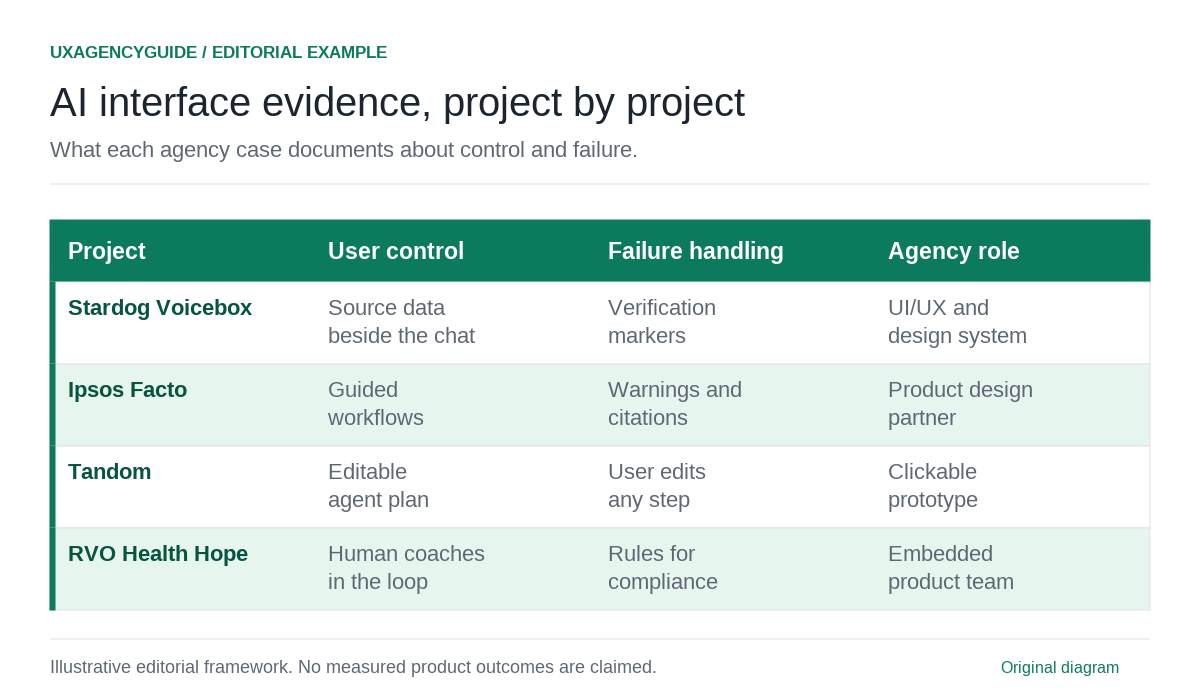
Fuselab Creative’s Stardog Voicebox case describes a conversational workspace where financial analysts query datasets in natural language. The agency describes complete UI/UX, a new design system and the conversational interface itself. Its design puts the fund data table beside the AI chat, adds verification markers to each AI response and keeps a conversation library linked to source documents. The agency reports a 20% rise in time spent and a 27% rise in new user conversion since launch, without a stated baseline.
Fuselab’s AI design practice page states its approach as designing the failure case before the successful path and lists confidence and fallback patterns, override controls and audit trails as deliverables. It publishes rates of $100 to $150 per hour, from $25,000. Investigate Fuselab for enterprise and regulated AI where users must verify outputs against data.
Lazarev.agency: moving beyond pure chat
Lazarev.agency’s Accern Rhea case describes an AI research tool for financial analysts and investors. The agency says a purely chat-based interface was not enough, and designed a widget-based interface that adapts to the conversation, a prompt field that works like a command line for actions such as notifications and scheduling, and clarifying questions when a query is unclear. The agency attributes fundraising and an acquisition to its long partnership with the client; those are business outcomes, not interface measurements.
Lazarev’s Elva case adds a consumer example with draft-and-approve steps for an AI video editor. Investigate Lazarev for AI products where the interface needs to combine conversation with structured tools.
GoInvo: guidance, limits and citations in an enterprise tool
GoInvo’s Ipsos Facto case describes redesigning an AI platform for market researchers after an early chatbot saw low adoption. The agency’s changes include guided workflows, templates, visible suggestions, limitations and disclaimers, hallucination warnings and citation metadata. The agency reports adoption above 90% across Ipsos, and says the tool is about a quarter of the way to a mature enterprise product, which is a refreshingly candid limit.
This is strong evidence for internal AI tools where adoption depends on users trusting and understanding the output. Ask GoInvo how it measured the move from low to high adoption, and which design change it believes mattered most.
ustwo: generative conversation with rules and human coaches
ustwo’s RVO Health case describes an SMS coaching product for people trying to stop smoking. ustwo embedded product, delivery and engineering staff, and describes an AI orchestration layer that combines deterministic rules for compliance with generative conversation, while human coaches stay in the loop with a unified member profile. The agency reports 57% engagement against 22% for the previous scripted program.
This is one of the clearest examples here of designing the boundary between automation and people in a sensitive domain. Its AI principles page describes explainability and guardrail development as services. Ask how the team decided which messages must be rule-based.
Cieden: editable plans for agentic workflows
Cieden’s Tandom case describes a logistics automation platform where users create AI agents by chatting. The central design decision is that each chat exchange produces a structured plan of what the agent will do, and every step can be opened and edited. The agency describes one product designer and one business analyst working with the client’s CEO and CTO for about two months, moving from low fidelity to a clickable prototype within the client’s existing component library.
The engagement was short and produced a prototype for a beta, not a measured release. It is good evidence of a pattern that suits agentic products: let the user express intent in conversation, then review and correct it as a plan.
Fantasy: making an AI assistant’s state visible
Fantasy’s Priceline Penny case covers brand and motion design for an AI travel assistant already used by millions of travelers. The agency describes an avatar with passive, listening, thinking and generating states, so latency and uncertainty are shown rather than hidden, and a “no exact match” result presented as a next planning step rather than a dead end. The work took eight weeks.
The scope is identity and motion, not the full product interface, so do not treat it as evidence of end-to-end AI product design. It is relevant when your AI product’s personality, state and tone need careful design. Ask how the motion states map to actual system events.
HTEC Momentum: defining how the product decides
HTEC Momentum’s article “AI isn’t the shift. What we design is.” argues that designing an AI product means defining how it makes decisions. It describes three layers (experience, an intelligent layer and the interface), argues that many hallucinations are failures of definition rather than of the model, and asks when a product should act on its own and when it should defer to the user.
This is a perspective piece rather than a case study, and we did not review a published HTEC Momentum AI product case. It is useful evidence of how the team thinks about decision logic. Ask to see a shipped AI project that applies the framework before shortlisting.
Neuron: human-in-the-loop automation
Neuron’s Vendr case is not an AI product. It describes a procurement workflow builder with conditional and parallel steps and explicit human approval points, handed to the client’s developers. We include it because many AI agent products face the same design problem: configuring automation that people can understand, review and override. We did not find a published Neuron AI product case during our review, so ask for one directly.
Copilot, conversational and workflow fit
The cases above fall into three broad patterns. Match your product to the pattern before matching it to an agency.
| Pattern | What the AI does | Typical control design | Agencies with matching evidence |
|---|---|---|---|
| Copilot over data | Answers questions about the user’s data | Side-by-side source data, verification markers, citations | Fuselab Creative, GoInvo, Lazarev.agency |
| Conversational assistant | Holds a dialogue toward a goal | Visible system state, clarifying questions, human escalation | ustwo, Fantasy, Lazarev.agency |
| Agentic workflow | Plans and executes multi-step tasks | Editable plans, approval steps, conditional logic | Cieden, Neuron (non-AI precedent) |
A product can combine patterns. A research copilot may also schedule follow-up actions, which turns part of it into an agentic workflow with different approval needs. Our chatbot UX design guide covers the conversational pattern in detail.
When chat alone is the wrong pattern
Three of the cases above began with, or moved away from, a chat-first design. Lazarev.agency says a purely chat-based interface was not enough for Accern’s analysts. GoInvo describes an early Ipsos chatbot with no clear mental model and low adoption, which it replaced with guided workflows and templates. Cieden kept chat in Tandom but turned each exchange into a structured, editable plan.
The common thread is that chat is good for expressing intent and poor for reviewing results. When users need to compare figures, check sources or approve a sequence of steps, they need structure: tables, plans, side panels and explicit controls. If an agency proposes a chat interface for your product, ask what the user does after the AI responds. If the answer involves careful checking, the design probably needs more than a conversation.
Testing AI interfaces with real outputs
Usability testing for AI products has a specific trap: testing with ideal responses. A prototype that always returns a correct, well-formatted answer tells you how people react to a system that does not exist. Ask each agency how it builds test material. Better approaches use recorded outputs from the actual model, including weak and wrong ones, or deliberately seeded errors so the study can observe whether people notice them.
Also ask what the agency measured. Useful measures for AI interfaces include whether participants detected an incorrect output, how long they took to verify a result, whether they could correct the system, and whether they understood when an action had actually been taken. Task completion alone can hide over-trust, where people complete the task by accepting a wrong answer.
Control and validation questions
Use these questions in agency conversations. Good answers point to specific screens and states.
- Show us a wrong answer. What did the user see when the AI was wrong, and how did they find out?
- Who approves an action? For anything with consequences, such as sending, booking or changing a record, where does the user confirm, and can they undo it?
- What happens with an ambiguous request? Does the system ask, guess or refuse, and who decided that?
- How were outputs tested? With real model outputs, including failures, or with ideal examples written by the design team?
- Which behavior is rule-based? In regulated or sensitive products, which responses must be fixed, and how does the interface show the difference?
- How is AI use disclosed? Does the user know when they are talking to an AI and when a human takes over?
An agency that has only designed the main chat screen will struggle with these. An agency that designed the recovery states will answer them quickly, often with examples.
Shortlisting and scoping
Start by writing down the AI task, the consequence of a wrong output and who must approve actions. That short statement tells you whether you need conversational design, data verification, workflow control or all three.
Then scope the design work around realistic outputs. Give the agency access to real or representative model responses, including poor ones, early in the project. A design built on ideal outputs will look convincing in a demo and fail in use.
Separate design from model ownership. The agency designs the interaction; your team or a build partner usually owns the model, prompts, retrieval and evaluation. Write down who decides on prompt changes and who signs off on behavior in sensitive cases.
Plan a staged engagement. Several cases here began with a short prototype (Cieden’s took about two months) before larger commitments. A first phase that produces a tested prototype of the riskiest interaction, usually the review or correction step, gives you real evidence before you commit to a full build. When you move to implementation, our AI interface design guide covers the review, confirmation and recovery patterns to carry into the build specification.
Budgeting an AI interface engagement
Published prices are rare, but two agencies in this guide publish useful reference points. Fuselab Creative lists rates of $100 to $150 per hour with engagements from $25,000. Cieden’s AI prototyping service lists a feature exploration sprint from $8,000 and a proof-of-concept app from $16,000, with indicative timelines of two and four or more weeks. These were checked in November 2026 and are starting points, not quotes.
Budget beyond design fees as well. AI interface work needs time from your engineers or data team to supply realistic outputs, and from domain experts to judge whether outputs are acceptable. If the product handles sensitive decisions, plan for review by legal, compliance or clinical advisers before release. Those costs often exceed the design fee in regulated settings.
A useful first-phase brief
A first phase for an AI interface engagement might include: a map of the AI’s tasks and their consequences; a prototype of one high-risk interaction including its failure states; a short usability study with representative users and real model outputs; and a written recommendation on control patterns for the full product. That is small enough to compare agencies on, and specific enough to show which of them understands the problem.
Frequently asked questions
What does an AI interface design agency actually do?
It designs how people interact with an AI system: how the product explains what it can do, how users ask for something, how outputs are shown and checked, and what happens when the AI is wrong or uncertain. It is different from an agency that simply uses AI tools to speed up its own design work.
How do I tell real AI interface experience from marketing?
Ask for a shipped or tested AI product and have the team walk through a failure case: a wrong answer, an ambiguous request or a missing source. Agencies with real experience can show the review, correction and fallback states they designed, not only the main chat screen.
Does an AI product need a chat interface?
Not necessarily. Several agency case studies in this guide moved away from chat alone toward structured plans, side-by-side data views or guided workflows, because users needed to review and act on results. The right pattern depends on the task and how much the user has to verify.
Should the agency also build the AI model?
Usually the model, data pipeline and evaluation belong to your engineering or data team, or to a separate build partner. The design agency needs access to realistic outputs and failure examples. Some agencies offer both design and engineering; confirm in writing who owns model behavior, prompts and evaluation.
Sources & evidence
- Stardog Voicebox conversational AI interface designChecked 2026-11-20
- AI product design agency for regulated and enterprise AIChecked 2026-11-20
- Accern Rhea design case studyChecked 2026-11-20
- Priceline Penny AI assistant: brand and motionChecked 2026-11-20
- AI isn’t the shift. What we design is.Checked 2026-11-20
- AI agent UI design for TandomChecked 2026-11-20
- Vendr case studyChecked 2026-11-20
- The future of research intelligence: Ipsos FactoChecked 2026-11-20
- RVO Health x ustwoChecked 2026-11-20
- Microsoft HAX ToolkitChecked 2026-11-20
- AI x ustwoChecked 2026-11-20
- AI prototyping serviceChecked 2026-11-20
Specific sources, useful examples and clear limitations make advice easier to assess.
Read the editorial policy