The best Figma alternative depends on which part of Figma you need to replace. Interface editing, component maintenance, interactive prototyping, review, developer inspection and website publishing are different jobs. A product that handles one well may leave another part of the workflow unresolved.
Start by writing the replacement requirement. A team seeking open-source infrastructure faces a different decision from a Mac-based studio evaluating a native editor. A founder publishing a marketing site may need a website platform rather than a substitute for every design-file capability.
This 2027 planning guide uses official documentation checked in November 2026. It provides an original migration framework and task-based comparison, not a claim that every import path or paid feature has been tested. No lossless migration, task-speed result or universal cost saving is asserted.
Which Figma job are you replacing?
Separate the current workflow into authoring, reuse, collaboration, interaction and handoff. List who performs each job and what they must be able to continue doing. This avoids comparing tools only through the lead designer’s experience while overlooking reviewers, developers and future maintainers.
A component-heavy product team may depend on variants, shared styles and structured layout. A research team may care more about branching behavior and the ability to reset a study. A client may need a stable browser review link without becoming an editor. Those requirements can produce different shortlists.
| Replacement need | Alternative to investigate | Boundary to check |
|---|---|---|
| Open-source interface design | Penpot | Real project import, component behavior and operating responsibility |
| Native Mac design workflow | Sketch | Editing platform versus browser review and inspection |
| Detailed conditional prototype | Axure | Interaction depth versus the broader design-system workflow |
| Early wireframing | Balsamiq | Structural discussion versus high-fidelity product design |
| Hosted marketing website | Framer | Publishing and CMS versus source export and app-design needs |
The right result may be a connected toolset rather than a complete replacement. That can be reasonable if the handoffs are explicit. It is less useful when the team discovers afterward that comments, component relationships or prototype logic were left behind.
Test protocol and current plans
Use a small but representative file for evaluation. Our suggested task is an invitation flow for a fictional maintenance application. It contains a reusable input and button, role selection, a permission explanation, an error, pending status and a failed-send recovery. Include one narrow layout and one realistic long content value.
The task is deliberately more demanding than recreating a static card. It exposes layout, component, state and collaboration requirements that a screenshot comparison would miss. Run it on the plan you intend to buy, so the result reflects the features you will actually pay for.
The test file and acceptance criteria
The file is deliberately small: one invitation screen and its states, with enough structure to expose differences between tools. Each tool should open or rebuild the same file, and each criterion is recorded as pass, limitation or fail.
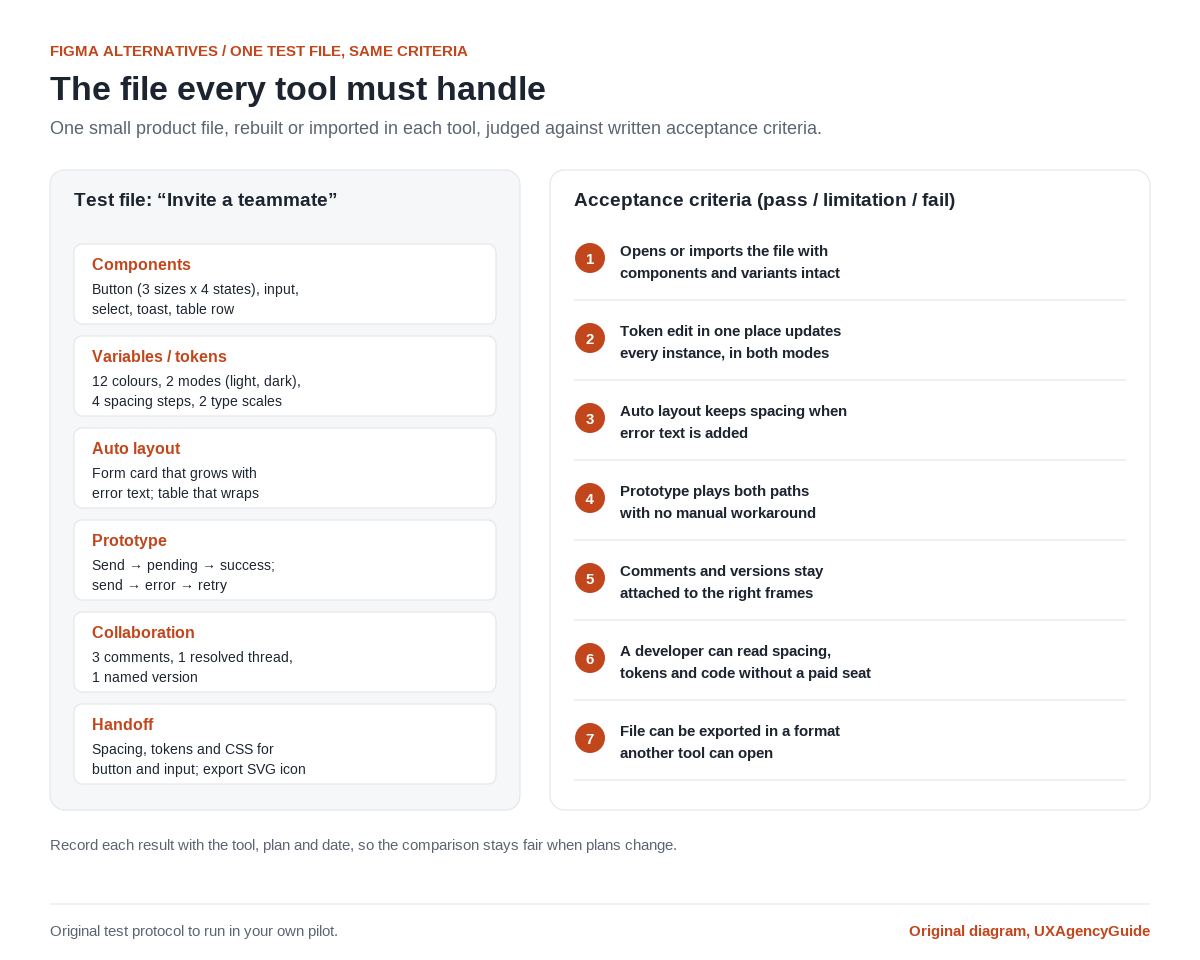
| Part of the file | What it contains | Acceptance criterion |
|---|---|---|
| Components | Button in 3 sizes and 4 states, input, select, toast, table row | Opens or imports with components and variants intact |
| Variables or tokens | 12 colors in light and dark modes, 4 spacing steps, 2 type scales | Changing one token updates every instance, in both modes |
| Auto layout | A form card that grows with error text; a table that wraps | Spacing holds when error text is added |
| Prototype | Send, pending, success; and send, error, retry | Both paths play without a manual workaround |
| Collaboration | Three comments, one resolved thread, one named version | Comments and versions stay attached to the right frames |
| Handoff | Spacing, tokens and CSS for the button and input; one exported SVG icon | A developer can read them without a paid editing seat |
| Exit | The whole file | It can be exported in a format another tool can open |
Record the date, plan and account type beside every result, because many of these features differ by plan. If a feature is not available on the account you used, record that rather than assuming it works.
Record the plan and account conditions
Note the current plan, user role, operating system and sharing permissions. Vendor pages can distinguish features by seat or workspace configuration. Verify the exact entitlement needed for your team, rather than transferring a claim about a basic feature to every advanced capability.
Keep pricing separate from portability. A lower subscription fee can be attractive, but it does not establish a saving once migration, training, maintenance and additional tools are included. Likewise, open-source software can give operating flexibility while still requiring infrastructure and support work.
Use pass, limitation and unknown
An acceptance record should distinguish a requirement that was demonstrated from one that remains unknown. If a trial account cannot expose an export option, do not automatically mark the requirement as supported or unsupported. Identify the missing evidence and decide whether it is essential before purchasing.
This simple discipline prevents an optimistic comparison table from becoming a commitment based on assumptions. It also gives the team a practical list of questions for the vendor or supplier.
Alternative profiles
Side by side
The table sets the five alternatives against Figma on the points that decide most migrations. Each entry comes from the vendor’s own documentation and pricing pages.
| Tool | Components and layout | Prototyping | Developer handoff and reviewers | Export and file format | Starting price | Platforms |
|---|---|---|---|---|---|---|
| Figma (baseline) | Components; auto layout; variables with modes for themes | Variables, expressions and if/else conditions | Unlimited free viewers can view, comment, inspect and copy CSS, iOS and Android code | PNG, JPG and PDF | Starter free; Professional Full seat $16 per month | Web |
| Penpot | Components and variants; CSS flex and grid layouts; native design tokens | Interactive prototypes | Free inspect mode on all plans, with code as SVG, CSS and HTML; unlimited viewers | Open standards: SVG, CSS, HTML and JSON; Figma files arrive through the Penpot Exporter plugin | Professional free; Unlimited $7 per editor per month, capped at $175 | Web, or self-hosted |
| Sketch | Components with variants by property; Stacks layouts; color variables, with tokens exportable as CSS or JSON | Hotspots, overlays, hover and press interactions, Smart Animate | Free browser handoff for unlimited developers; copy CSS from any layer | PNG, JPG, HEIC, TIFF, WebP, PDF, EPS and SVG; open file format; imports .fig files | Standard $12 per editor per month, billed yearly; 30-day trial | Mac app, web app, iPhone and iPad viewer |
| Axure RP | Built for interaction logic rather than visual systems | Advanced prototyping, with co-authoring and revision history on Team | Unlimited viewers on Axure Cloud | Unlimited publishing and hosting on Axure Cloud | RP Pro $29 per user per month; Axure Cloud free for viewing | Windows and Mac; Axure Cloud on the web |
| Balsamiq | Reusable custom UI components in a deliberately low-fidelity style | Clickable prototypes from wireframes | Free reviewers who can view and comment | PNG, PDF and HTML | Starter $16 per editor per month, billed annually; 14-day trial | Web; Windows and macOS desktop |
| Framer | Components with variants; auto-layout stacks and grids | Clicks, hovers and taps on a live website | Free viewers; connects to coding agents such as Claude Code and Cursor | Images and SVG; publishes straight to the web | Free plan; Basic site $10 per month; extra editors $20 | Web, Mac and Windows |
Prices are in US dollars as shown on each vendor’s own pricing page on 23 November 2026. Billing periods and plan names change often, so check the current page before buying.
Three patterns stand out. Penpot and Sketch both give developers free access to inspect designs, which matters if most of your team only reads files. Penpot is the only option here that can be self-hosted. Axure and Balsamiq are not general Figma replacements: one goes deeper on interaction logic, the other deliberately stays at wireframe level.
Penpot: open-source interface design
Penpot’s features page describes SVG-based design, layout capabilities and prototyping. Its developer tools support inspecting design properties and assets. It is worth investigating when the team values an open-source route and code-facing collaboration.
Do not assume that sharing an image format makes every editor’s internal model interchangeable. Components, constraints, fonts and interaction behavior need a real file check. The useful question is whether your project remains maintainable after migration, not simply whether the first screen appears correctly.
The self-host offering also requires an operating decision. Someone must own deployment, updates and backups. Include those responsibilities when comparing a managed service with a self-hosted route; the absence of a software fee does not make administration disappear.
Sketch: Mac editing with browser collaboration
Sketch’s introduction identifies the Mac application as the design editor and distinguishes browser-based access. Its coediting documentation places real-time editing in the Mac application. This matters for teams with mixed operating systems.
The developer-handoff documentation describes browser inspection and developer access. That can support a workflow where designers use Macs and other collaborators review or inspect through the browser. It should not be described as full browser editing for everyone.
During a trial, assign the actual reviewer and developer roles. Check whether they can inspect the relevant state, locate the current version and obtain the assets required. A successful designer-only evaluation leaves that collaboration question unresolved.
Axure: interaction logic as the priority
Axure’s conditional logic supports state-dependent interactions. It is relevant when the replacement need is a detailed prototype with branching or form behavior, rather than only a shared visual editor.
Decide whether that interaction depth justifies another handoff. The team may still maintain visual design elsewhere. A simulated rule can support an evaluation, but it does not establish production data handling or security. Keep the prototype’s purpose and limits in the project record.
Balsamiq: structure before visual detail
Balsamiq’s wireframing introduction focuses on early interface discussion. Its board-linking guidance supports simple linked flows. That can be appropriate when the current task is defining hierarchy and sequence.
It is not a like-for-like replacement for every mature product-design workflow. Treat it as an alternative for a defined job. The artifact comparison explains why a low-detail wireframe and a high-detail interactive prototype can serve different decisions.
Framer: a publishing workflow
Framer’s CMS makes it relevant to a content-driven website task. Its HTML-export guidance states that HTML export for self-hosting is not provided. That is a significant boundary if the client expects to move the complete site to another host.
Consider Framer when the job is delivering and maintaining a website within its publishing model. Do not assume that it replaces the full application-design file, component library and developer handoff used by a product team. The comparison should follow the output you need to own.
File and collaboration comparisons
Visual fidelity is only the first check
Open a representative file and inspect layout, text, images and component structure. A screen can look correct while containing flattened or disconnected elements. Try changing a shared control and checking whether the intended instances update. That reveals whether the imported work remains a maintainable design system.
Check realistic content variation. A short label may hide a layout problem that appears with a long organization name or translated text. An invitation flow with one ideal address may not reveal how an error state affects the composition. Use the same demanding examples in each tool.
Inspect interaction and state coverage
Recreate the relevant actions, including an invalid entry, a changed role and a failed operation. Note which states are represented directly and which require a workaround. The purpose is not to maximize complexity, but to determine whether the tool can support the question the prototype must answer.
Keep simulated behavior labeled. A prototype that displays success after a click has not sent a real invitation. That distinction matters when a stakeholder sees a polished flow and assumes the technical system is nearly finished.
Review comments and version context
Invite a collaborator and ask them to identify the current design, leave a comment on a specific state and find a resolved decision. Check whether sharing exposes only the intended material. Permissions are part of the workflow, especially when an agency works with several clients.
Decide what happens to old comments during migration. Exporting them as a separate archive may preserve evidence without keeping their original interactive context. That can be acceptable if the team understands the trade-off and maintains a clear current reference.
Migration and handoff trade-offs
Migration is a change to the team’s working system, not just a file conversion. Components, naming conventions, libraries, review habits and developer expectations may all need adjustment. Budget time for a pilot before moving the active product work.
Run a bounded pilot
Choose a flow with enough complexity to expose the important requirements but not so much that the pilot becomes a second project. The fictional invitation task is one example. Use a real permitted subset of your product when possible, with appropriate handling of confidential material.
Assign an owner for each acceptance check. A designer checks editability and reuse. A developer checks inspection and assets. A researcher checks the represented task behavior. A project owner checks access and continuity. One enthusiastic evaluator should not silently decide for every collaborator.
Define an exit route
Ask what can be exported if the team changes tools again. Distinguish asset export, editable source files and complete application code. These are different outputs. A downloadable image does not preserve a prototype’s state logic, and generated markup does not automatically provide a production system.
Keep the original files and an appropriate backup during the transition. Document the date after which the new source becomes authoritative. Without that decision, the team can end up maintaining two versions while different collaborators implement different assumptions.
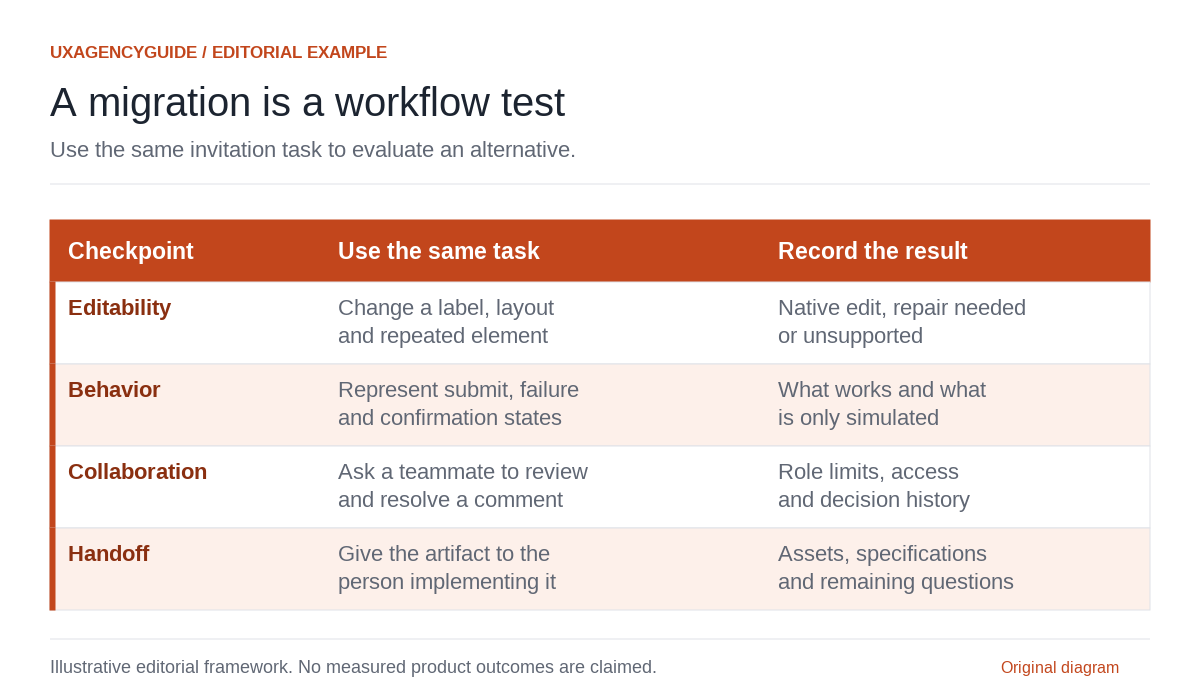
Design systems are the hardest part to move
Neuron’s DesignOps service describes setting up workflows, tools and automations within Figma, along with design-to-code connections to tools such as Storybook. That layer is where much of a team’s investment sits. Moving files to another editor is only part of a migration; component libraries, documentation, governance and the links between design tokens and code also have to be rebuilt or replaced.
Cieden’s Tandom case shows the opposite arrangement, with design work built around an existing code component library (shadcn/ui). Where the code library is the source of truth, the design tool matters less than how faithfully it mirrors those components. Include this layer in any pilot, and ask the agency or internal team to list which workflow automations would need replacing.
Choose the smallest workable toolset
Select the alternative that satisfies the essential workflow with a manageable operating model. Avoid adding products solely because each leads a different feature category. Every additional tool creates access, version and handoff responsibilities.
For a Mac-based interface team, a native editor with reliable browser review may be enough. For a team prioritizing open-source operations, the infrastructure decision may be central. For a researcher studying conditional behavior, a specialized prototype can be useful even if the primary design editor stays unchanged.
A practical decision record
Record the job being replaced, the essential requirements, the alternatives reviewed and the evidence behind the choice. State the limitations accepted and the conditions that would trigger reconsideration. This makes the decision understandable when the team changes or the tool’s plans evolve.
Keep the test file and the collaborator observations. They provide a stronger basis for renewal or expansion than the original feature list. If the tool repeatedly blocks a critical handoff, investigate the cause before buying another overlapping product to compensate.
Use the broader UX tools guide when the replacement question spans research, design and implementation. Use the testing-tools guide when the actual gap is study delivery rather than prototype authoring. Naming the missing job often reveals that a complete editor migration is unnecessary.
What a responsible recommendation looks like
A recommendation should say who the option suits and which boundary matters. “Investigate Penpot when open-source operation is an essential requirement” is more useful than “Penpot is best for everyone.” “Consider Sketch when the editing team uses Macs and browser collaborators can remain reviewers” describes an actual operating condition.
The best alternative is the one your team can use, maintain and hand off under its real constraints. A careful small trial and an honest limitation record are more valuable than a sweeping promise that every Figma workflow can be replaced without friction.
Review the first real delivery cycle
After the pilot, use the selected setup for a bounded piece of actual work. Keep the old source available during the transition but identify which version governs implementation. Review how a change moves from request to design, feedback and engineering. A migration can preserve files while still disrupting that sequence.
Check the maintenance tasks that occur after the first delivery. Can the team update shared text styles, replace an icon and revise a permission state without rebuilding unrelated work? Can a new collaborator understand the naming and source structure? These questions reveal whether the replacement remains useful after the initial enthusiasm.
Include the client’s future access
An agency may choose a tool that works well internally while the client expects to make small changes after handoff. Ask what access the client will have, whether an editor seat is needed and what training or documentation is included. A browser review link is not the same as ownership of editable source material.
When the client plans to change suppliers, define how libraries and project history will transfer. Some information may need an archive or written decision record rather than a direct import. That is acceptable when it is intentional and proportionate. It is problematic when the client discovers the limitation only after ending the previous subscription.
Finally, keep the commercial and technical decisions connected. A plan change can alter access for collaborators even when the file itself is untouched. Review renewal requirements against the current workflow and confirm that essential editing, inspection and export rights remain available. The original tool choice should remain explainable through the work it supports, not merely through a feature comparison that is no longer current.
Write down one accepted limitation before committing. The team might accept a separate high-logic prototype tool, a Mac-only editing requirement or a hosted publishing boundary because the benefit fits its current work. Explicit acceptance is more useful than discovering the same constraint during a deadline. Revisit that choice when collaborators, ownership requirements or product scope change.
Frequently asked questions
Which Figma alternative is open source?
Penpot provides an open-source route worth investigating. Check actual file compatibility and account for infrastructure, updates and administration if choosing self-hosting.
Can Sketch designers edit entirely in the browser?
Sketch distinguishes its Mac design editor from browser review and inspection. Confirm current platform and collaborator requirements for the team’s actual workflow.
Can Framer sites be exported as HTML for self-hosting?
Framer’s official documentation states that HTML export for self-hosting is not offered. Confirm its current publishing model before selecting it for a client who requires that ownership route.
Sources & evidence
- Penpot design and code featuresChecked 2026-11-19
- Dev toolsChecked 2026-11-19
- Penpot self-host pricingChecked 2026-11-19
- What is Sketch?Checked 2026-11-19
- Real-time collaborationChecked 2026-11-19
- Developer handoffChecked 2026-11-19
- Conditional logicChecked 2026-11-19
- What is Balsamiq?Checked 2026-11-19
- Linking boards togetherChecked 2026-11-19
- Framer CMSChecked 2026-11-19
- Can I export my website to HTML and self-host it?Checked 2026-11-19
- DesignOps servicesChecked 2026-11-20
- AI agent UI design for TandomChecked 2026-11-20
- Figma pricing and plan featuresChecked 2026-11-23
- Penpot vs FigmaChecked 2026-11-23
- Penpot pricingChecked 2026-11-23
- Sketch featuresChecked 2026-11-23
- Sketch pricingChecked 2026-11-23
- Sketch vs FigmaChecked 2026-11-23
- Axure pricingChecked 2026-11-23
- Axure Cloud pricingChecked 2026-11-23
- Balsamiq pricingChecked 2026-11-23
- Balsamiq WireframesChecked 2026-11-23
- Framer design featuresChecked 2026-11-23
- Framer pricingChecked 2026-11-23
Specific sources, useful examples and clear limitations make advice easier to assess.
Read the editorial policy