Framer and Webflow can both build and host a strong startup marketing website. Framer is designed around quick, design-led publishing, with a lighter editing model and plan limits that are easy to read. Webflow is designed around structured content and team control, with a detailed CMS and granular roles. The right choice depends less on which tool is more capable and more on your content, the people who will edit the site and how it will grow.
This comparison is based on official documentation checked in November 2026: Framer’s and Webflow’s pricing pages, Framer’s help pages, Webflow’s help center and Webflow University courses and SEO checklist. We also define one shared build and maintenance test for your team to run.
Define the site and editors
Before comparing platforms, write down what the site needs to do and who will maintain it.
Content model. How many page types will the site have? Will it publish a blog, case studies, job listings, changelogs or documentation? Content that repeats with the same structure belongs in a CMS, and the shape of your CMS needs is one of the main differences between the platforms.
Editors. Who will update the site after launch? A designer who changes layouts, a marketer who writes posts, a translator, or all three? The editing roles each platform offers, and their cost, matter more over the site’s life than the initial build.
Growth. Will you add languages, landing pages for campaigns or hundreds of articles? Plan limits and pricing can change the decision as the site grows.
Ownership. Who will own the account, domain and content? Agencies often build startup sites; Arounda’s MVP service, for example, lists a marketing website delivered in Figma or Webflow among its deliverables. Design agencies may stop at handoff; Agente’s UX/UI design services, for instance, list information architecture, wireframes, visual design and clickable prototypes, so confirm early who will build the site on the chosen platform and who maintains it. Whoever builds it, make sure the startup owns the platform account and domain.
Shared build test
Build the same small site on both platforms:
Site. A marketing site for a fictional scheduling product, Shiftboard: a homepage, a features page, a pricing page, a blog with five posts and a contact form. Responsive at desktop, tablet and mobile. Connected to a custom domain.
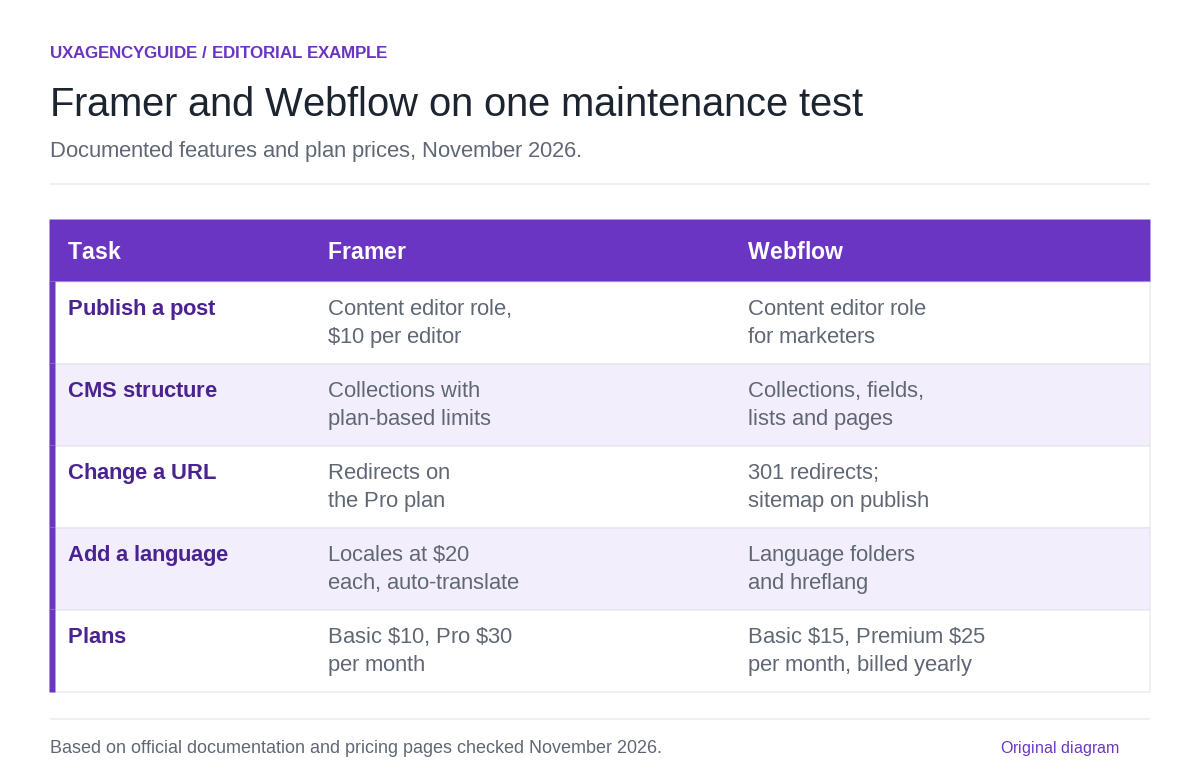
Maintenance tasks. A marketer publishes a new blog post with an image. A translator adds a Spanish version of the pricing page. The team changes the URL of the features page and keeps search traffic. A designer updates the homepage hero.
The maintenance tasks are as important as the build. Many platform decisions look right on launch day and wrong six months later.
CMS and content maintenance
Framer
Framer’s CMS documentation covers collections, on-page editing and Markdown. Its pricing page sets CMS limits by plan: the Basic plan includes 2 CMS collections and 1,000 items, and the Pro plan 10 collections and 2,500 items, with additional collections and items available as paid add-ons. Framer lists content editors, who can update the CMS, localization and on-page content, at $10 per editor, and additional full editors, who can design and publish, at $20 per editor.
Webflow
Webflow’s CMS and dynamic content course covers collections, fields, items, collection lists and collection pages, with the stated aim of letting teammates manage content without touching design. Its content editor course describes a content editor role for marketers, writers and translators, who can edit text, images and links directly on the canvas, create and publish CMS content and update page-level search settings without changing the site’s design. Webflow’s team setup course describes workspace and site roles, custom roles and granular access control by page, collection or locale.
What to compare
For the blog post task, record how many steps the marketer needed and whether they could break the layout by mistake. For a startup with a small blog, both platforms’ CMS features are likely to be enough; the difference appears with many collections, complex relationships between content types or several editors who need different permissions. Webflow documents more granular access control. Framer documents simpler, clearly priced editor roles.
Accessibility and search controls
Accessibility
Neither platform makes a site accessible automatically. Framer’s accessibility documentation covers alt text, semantic tags for navigation and footers, ARIA labels, tab order, reduced motion, contrast and descriptive link text. Webflow’s SEO checklist includes guidance on alt text and semantic HTML. Plan to check accessibility yourself on either platform, with an automated checker and a keyboard and screen-reader pass.
Test the published site, not the editor. Use a keyboard to reach every link and form field, check headings with a screen reader and verify color contrast. The W3C’s Web Accessibility Initiative publishes the standards and guidance to test against.
Search controls
Both platforms document the controls a marketing site needs.
Framer. Its SEO documentation covers page titles and descriptions, including dynamic values for CMS items, an automatically generated sitemap, robots.txt, redirects, structured data in JSON-LD, connection to Google Search Console and controls to prevent pages from being indexed. Redirects are listed on the Pro plan.
Webflow. Its SEO checklist describes an automatically generated sitemap that updates on publish, 301 redirects when URLs change, a global canonical tag option, a setting to stop the staging subdomain being indexed and Open Graph settings per page, noting that Open Graph tags cannot be set globally.
For the URL change task, check that the redirect works and that the old URL no longer appears in the sitemap.
Localization
Framer’s localization documentation covers adding locales, automatic translation of canvas and CMS content, localized page paths and language attributes, with additional locales priced at $20 each. Webflow’s SEO checklist describes localization with language folders, hreflang tags and language attributes per locale, and Webflow Localize covers static pages and CMS items, AI or manual translation, localized URLs, metadata and sitemaps, priced as an add-on from $9 per month billed yearly for one locale. For the translation task, record whether the translator could work without a designer and whether the localized page had correct language settings.
Current plans and ownership
Framer. Framer’s pricing page, checked on 20 November 2026, lists a free plan with a Framer domain, a Basic plan at $10 per month with a free custom domain, 30 pages and 50 GB bandwidth, a Pro plan at $30 per month with 150 pages, 100 GB bandwidth, redirects, staging and branching, and custom Enterprise pricing. Framer notes that all prices are monthly and billed according to the cycle chosen at checkout. Extra pages, collections, items, bandwidth and locales are available as add-ons.
Webflow. Webflow’s pricing page, checked on 23 November 2026, lists prices per site. The free Starter plan has a webflow.io domain, limited CMS, 2 static pages, 1 GB bandwidth and 50 form submissions. Basic, for sites that do not need a CMS, costs $15 per month billed yearly ($25 monthly) with a custom domain, 300 static pages, 10 GB bandwidth and unlimited form submissions. Premium adds the Webflow CMS, 50 GB bandwidth, site search and form file uploads for $25 per month billed yearly ($39 monthly). The Team platform plan, at $2,500 per month on an annual contract, adds Localize, publishing workflows and governance features. Workspace seats are priced separately from site plans.
Side by side
| Framer | Webflow | |
|---|---|---|
| Free plan | Framer domain, 1 GB bandwidth | webflow.io domain, 2 static pages, limited CMS, 50 form submissions |
| Cheapest plan with a custom domain | Basic, $10 per month | Basic, $15 per month billed yearly ($25 monthly) |
| Plan with a CMS | Basic includes 2 collections; Pro includes 10 | Premium, $25 per month billed yearly ($39 monthly) |
| Forms | Built-in forms sent to email, Google Sheets or webhooks | 50 submissions on Starter; unlimited from Basic; file uploads on Premium |
| Localization | Add-on locales at $20 each | Localize add-on from $9 per month billed yearly ($12 monthly) for one locale and 10,000 words |
| Search settings | Page titles and descriptions, automatic sitemap and robots.txt, JSON-LD; redirects on Pro | 301 redirects, sitemap on publish, localized metadata and sitemap with Localize |
| Analytics | Built-in, cookie-free analytics (30 days on Basic, 90 days on Pro) | Analyze add-on from $9 per month billed yearly ($12 monthly) for 2,000 sessions |
| Content editing | Content editors $10 each; extra editors $20 each | Content editor role for marketers, writers and translators; collection-specific access |
Prices are in US dollars as shown on each vendor’s own pricing page on 23 November 2026. Webflow prices are per site. Billing periods and plan names change often, so check the current pages before buying.
The practical difference for a startup is where the CMS starts. Framer includes a small CMS from its first paid plan, while Webflow keeps Basic for static sites and puts the CMS in Premium. If the site needs a blog or case-study library from launch, compare Framer Basic or Pro with Webflow Premium, not with Webflow Basic.
Count the full cost
Add up the site plan, editor seats, localization and any add-ons for the site you expect in a year, not the site you launch. For a small startup site, the platform cost is usually modest compared with design and content work; our website redesign cost guide covers how to budget the whole project.
Plan for leaving
Startups change direction. Before committing, check how you would export content and move to another platform if needed, and keep your own copy of important content such as blog posts.
Forms, analytics and integrations
Marketing sites rarely stand alone. They collect leads, report traffic and connect to sales and email tools, and those connections often decide how well a platform fits.
Forms. Check where form submissions go, whether you can send them to your CRM or email tool, and how spam is handled. For the contact form in the shared test, submit a test entry and confirm it arrives where the sales team will see it.
Analytics. Framer’s integrations documentation lists forms, analytics and third-party tools, including Google Tag Manager, Google Analytics, Hotjar, Intercom, Mailchimp, HubSpot, Typeform and webhooks. Webflow offers its own Analyze add-on, from $9 per month billed yearly for 2,000 sessions, alongside apps in its marketplace. Whichever platform you choose, confirm that your analytics respect your privacy notice and any consent requirements.
Performance. Both platforms host sites for you, so most performance work is in your hands: image sizes, fonts, animations and third-party scripts. Measure the published site’s performance on a mobile connection, not only in the editor, and remove scripts you do not need.
Integrations you will need later. List the tools you expect to connect in the next year, such as a scheduling widget, a job board or a customer portal link. A platform that integrates easily with your current tools may still be awkward with the ones you add later.
Selection checklist
| Question | Leans toward Framer | Leans toward Webflow |
|---|---|---|
| Is the team design-led and publishing quickly? | Yes | |
| Is the content model complex, with many related collections? | Yes | |
| Do editors need granular permissions by page or collection? | Yes | |
| Do you want simple, published plan limits? | Yes | |
| Will designers build in Figma and rebuild elsewhere anyway? | Either; compare effort | Either; compare effort |
| Do you need localization soon? | Compare both | Compare both |
Steps to decide
- Write the content model and list the editors and their tasks; our UX design brief template has a section for constraints and ownership.
- Run the shared build and maintenance test on both platforms.
- Record time taken, steps needed and any problems for each task.
- Check the published site for accessibility and search settings.
- Compare the full annual cost for the site you expect in a year.
- Confirm account and domain ownership and how you would export content.
If the question is really about whether to design in Figma and publish elsewhere, our Figma vs. Framer comparison covers that workflow. Either platform can serve a startup well; the better one is the one your team can keep updating without friction long after launch.
Keep the results of the shared test with the site’s documentation. When the team grows, the content model changes or a platform changes its plans, re-running the same maintenance tasks is the quickest way to check whether the original choice still fits.
Frequently asked questions
Is Framer or Webflow better for a startup website?
Both can run a capable marketing site. Framer is often chosen for fast design-led publishing with a simple editing model. Webflow is often chosen for more structured CMS work and granular team roles. The better choice depends on your content model, who will edit the site and your budget, so test both with the same small site.
How much do Framer and Webflow cost?
On 23 November 2026, Framer listed a free plan, Basic at $10 per month and Pro at $30 per month, with additional editors from $10 to $20 per month. Webflow listed a free Starter plan, Basic at $15 per month and Premium, which includes the CMS, at $25 per month when billed yearly ($25 and $39 billed monthly). Webflow prices are per site; check both pricing pages before buying.
Can marketers edit content without designers?
Yes, in both. Framer documents content editors who can update the CMS, localization and on-page content. Webflow documents a content editor role for marketers, writers and translators who can edit text, images, links and CMS content without changing the site’s design.
Are Framer and Webflow sites accessible by default?
Neither tool makes a site accessible automatically. Both document features that help, such as alt text and semantic tags, but accessibility depends on how the site is designed and built. Test the published site with a keyboard, a screen reader and a contrast checker.
Sources & evidence
- Framer pricingChecked 2026-11-20
- Framer CMS helpChecked 2026-11-20
- Framer SEO helpChecked 2026-11-20
- Framer localization helpChecked 2026-11-20
- Framer accessibility helpChecked 2026-11-20
- Webflow for content editorsChecked 2026-11-20
- CMS and dynamic contentChecked 2026-11-20
- Set up your team in WebflowChecked 2026-11-20
- Webflow SEO checklistChecked 2026-11-20
- W3C Web Accessibility InitiativeChecked 2026-11-20
- Hire MVP designersChecked 2026-11-20
- UX UI design servicesChecked 2026-11-20
- Framer integrations helpChecked 2026-11-20
- Webflow pricingChecked 2026-11-23
- Webflow LocalizeChecked 2026-11-23
- Intro to the Webflow CMSChecked 2026-11-23
Specific sources, useful examples and clear limitations make advice easier to assess.
Read the editorial policy